Confirmation of spouse / family information
9. Spouse information
9-1 Spouse information (this year)
If your spouse is a tax deductible for this year
Your spouse lives outside of Japan (non-resident)
Non residents between the ages of 30 and 70
9-2 Spouse information (next year)
10. Dependents information
Deductible dependent is non resident
Non residents between the ages of 30 and 70
Non residents between the ages of 19 and 23
9. Spouse information
The registered spouse information will be reflected before the YTA Wizard starts. (up to that point for those who have made changes in the "Personal information" page of the wizard)
Please carefully read the contents showing on your wizard screen and register your spouse's information and any changes needed for year end tax calculation.
If your spouse or dependent has passed away , don't delete or do anything else. And after year-end adjustment has been completed in this year, click "Request deletion" from the Spouse and Dependents section for next year.
9-1 Spouse information (this year)
■No spouse
(Example1) Those with neither spouse nor dependents
(Example2) Those who have no spouse, but have dependents
(Example1) Those with neither spouse nor dependents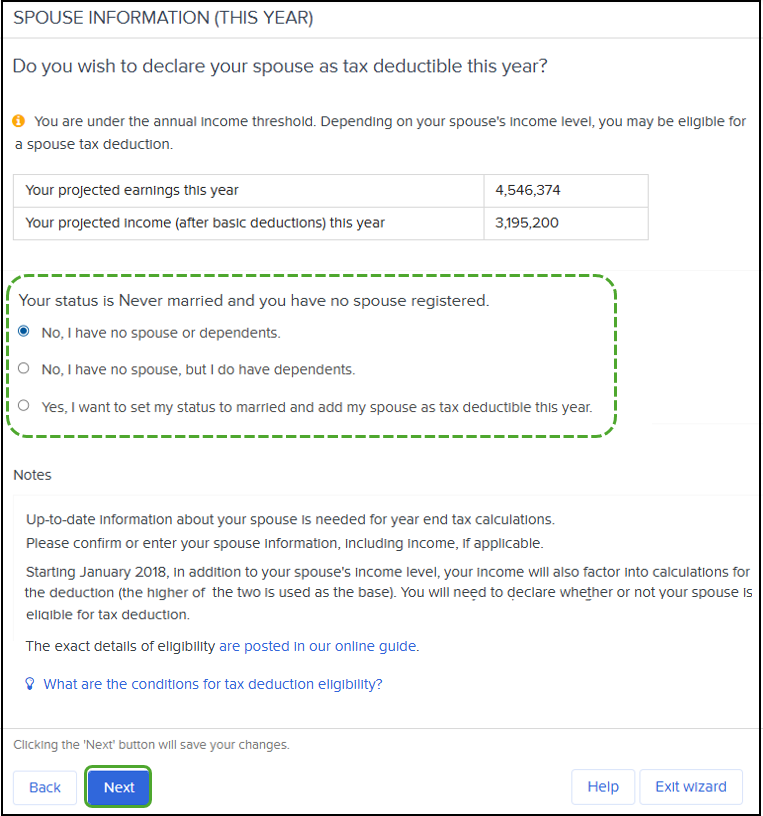
Select “No, I have no spouse or dependents.” then click “Next” to proceed.
→ Please go to step 11. Digital insurance records
(Example2) Those who have no spouse, but have dependents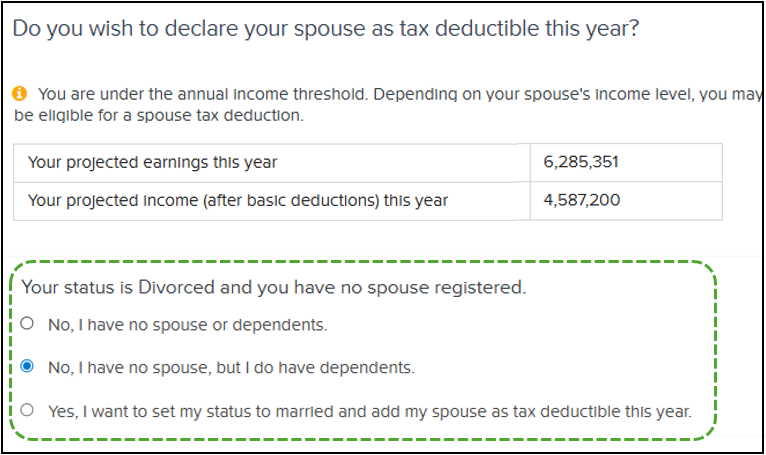
Select “No, I have no spouse, but I do have dependents.” then click “Next” to proceed.
→ Please go to step 10. Dependents information
■For those with spouse
For those with spouse, the subsequent pages to be displayed will depend on your “Marital status,” “Registered spouse information,” and “Your income.”
Please carefully read the contents showing on your wizard screen, select the fields that apply to you and proceed with the wizard.
If you have a registered spouse, the following process is used to verify your spouse's information. If you do not have a registered spouse, register your spouse first and then check your spouse's information.
(Example3) Those who have registered as spouse
(Example4) Marital status "Married" and not registered as a spouse. Those who want to make their spouse a tax deductible
(Example5) Those with marital status "Never married" who are married and register as a spouse for tax deductible
(Example3) Those who have registered as spouse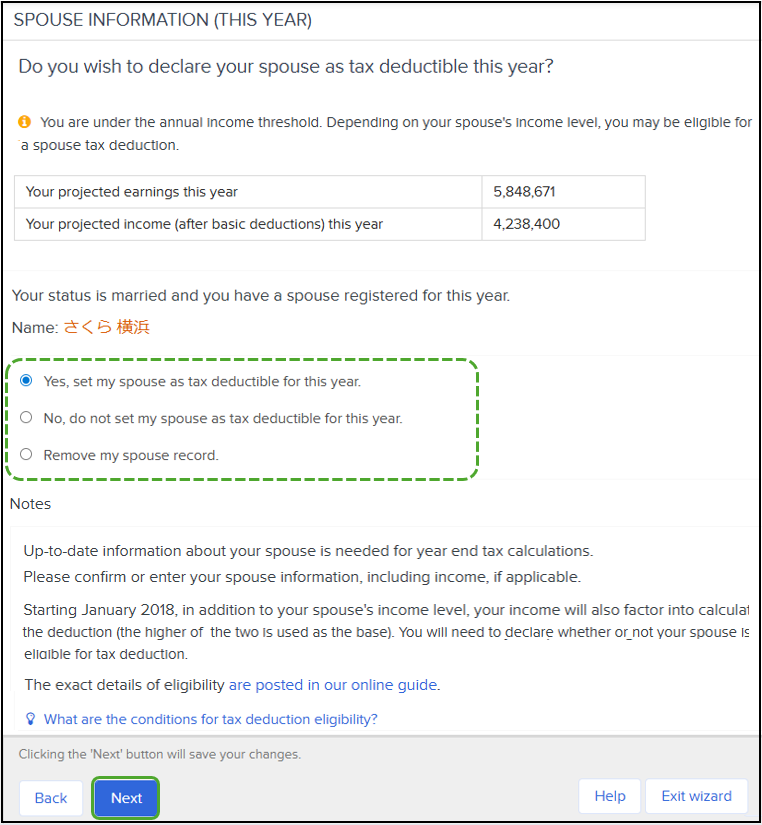
In the below screen, select the option that applies to you, then click “Next” to proceed.
If you selected "Yes, set my spouse as tax deductible for this year," please refer to "If your spouse is a tax deductible for this year."
(Example4) Marital status "Married" and not registered as a spouse. Those who want to make their spouse a tax deductible
You need to register your spouse.
Select “Yes, add my spouse now and set as tax deductible for this year,” then click “Next”.
Register your spouse's information.
Enter the information about your spouse and click “Submit changes.”
Note: If you do not know your spouse's My Number Tax ID, you may leave it blank.
[Social insurance dependent and Tax dependent settings]
When you add a spouse in YTA Wizard, it is set up with “Social insurance dependent: No” and “Tax Dependent: Yes”.
If any of the following applies to you, please contact your HR. Your HR (or other department) member can change it.
・Social insurance dependent: Yes /Tax dependent: Yes
・Social insurance dependent: Yes /Tax dependent: No
・Social insurance dependent: No /Tax dependent: No
*Please let them know if next year (2026) is planned to be the same as the above setting or different from this year's setting.
If your spouse is a tax deductible for this year
If you have registered your spouse and made him or her tax eligible for this year, a confirmation screen will appear.
Refer whichever applies to you.
■Your spouse lives in Japan
■Your spouse lives outside of Japan (non-resident)
Your spouse lives in Japan
After confirming, click "Next.” If you need to make any corrections, click "Edit" to correct the information.
Enter your spouse's income for the current year.
The amount you enter should be in yen, not in 10 thousand yen (e.g., for 10 thousand yen, enter 1,000,000).
The amount calculated automatically by subtracting income expenses and basic deductions from the income amount you entered will be reflected in the “Total income.”
Click “Next.”
Go to "9-2 Spouse information (next year).
Your spouse lives outside of Japan (non-resident)
You are required to submit “proof of family relationship” and “Proof of money transfer for this year.”
Even if you submitted both last year, the proof of money transfer must be submitted for this year (2025), please upload (or submit to your HR) on the edit screen of “Confirm spouse details (this year)”.
If there have been any changes to the contents of the proof of family relationship you have already submitted, please upload (or submit) proof proving the most recent changes to your family relationships.
For all certificated documents, a Japanese translation of the document must also be attached.
If your spouse is a non-resident between the ages of 30 and 70, see “Non residents between the ages of 30 and 70”.
① On “Confirm spouse details (this year),” click “Edit.”
② Set up the Proof of family relationship and Proof of money transfer fields.
Proof of family relationship
【Those who have already submitted】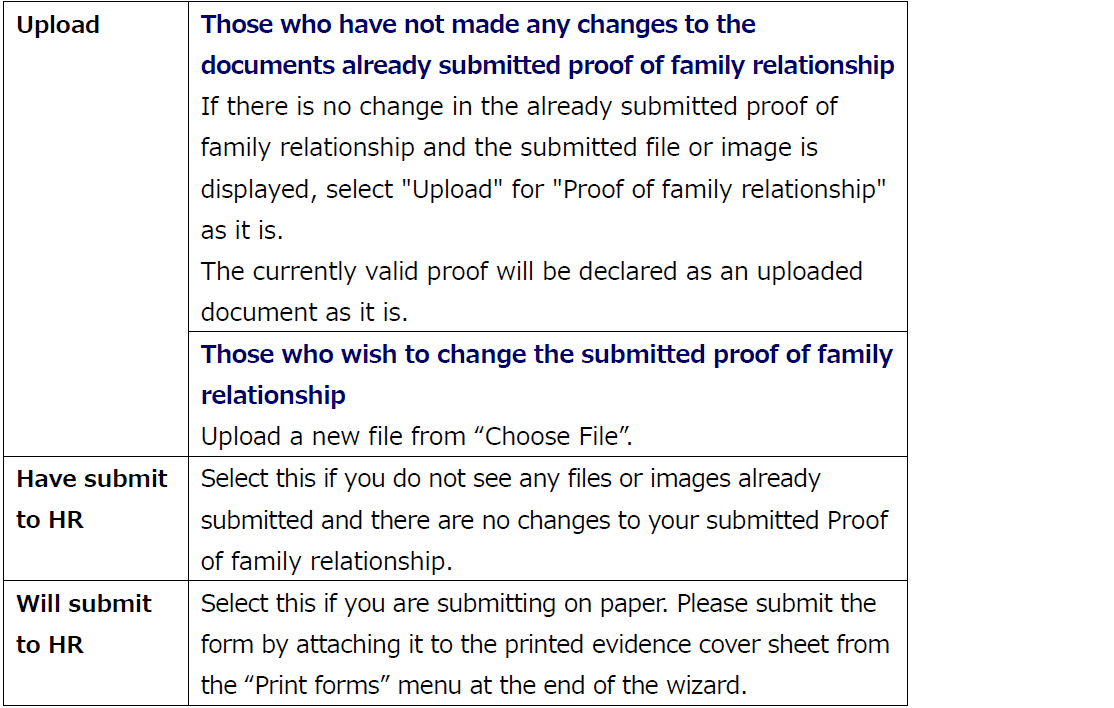
【Those who have already submitted】
Proof of money transfer
You must submit (upload) it for this year.
Even if there is no change in the proof of family relationship, you are required to submit proof of money transfer each year for that year (this year is 2025).
If you select "Will submit to HR," you will be listed in the list of certifications when you print the evidence cover sheet from the "Print forms" menu at the end of the wizard. Please attach the certification documents to that paper and submit it.
If you select "Proof of money transfer: upload" and upload more than one certificate, please go to "Add more files" to upload the second and subsequent certificates.
③ Click on "Submit changes.
④ Confirm and click “Next”. If corrections are needed, click “Edit” to make corrections.
⑤ Enter your spouse's income for the current year.
The amount you enter should be in yen, not in 10 thousand yen (e.g., for 1 million yen, enter 1,000,000).
The amount calculated automatically by subtracting income expenses and basic deductions from the income amount you entered will be reflected in the “Total income.”
Click “Next.”
Go to “9-2 Spouse information (next year)” .
Non residents between the ages of 30 and 70
Non residents between the ages of 30 and 70 are, in principle, not be eligible for tax deduction from 2023.
Please check if he (she) is eligible for the tax deduction from the "Confirm spouse details (this year)" and "Confirm spouse details (next year)" edit screens.
Note: If he (or she) meets any of the following conditions, he (or she) is eligible for the deduction as before.
・No longer have a domicile or residence in Japan due to studying abroad
・Disabled person
・Received more than 380,000 payments to cover living expenses or educational expenses in the year from a resident who would be eligible for the tax deductible.
① Click "Edit" under "Confirm spouse details (this year).
② Set up Proof of family relationship, confirmation of deductible, and Proof of money transfer fields.
Proof of family relationship
【Those who have already submitted】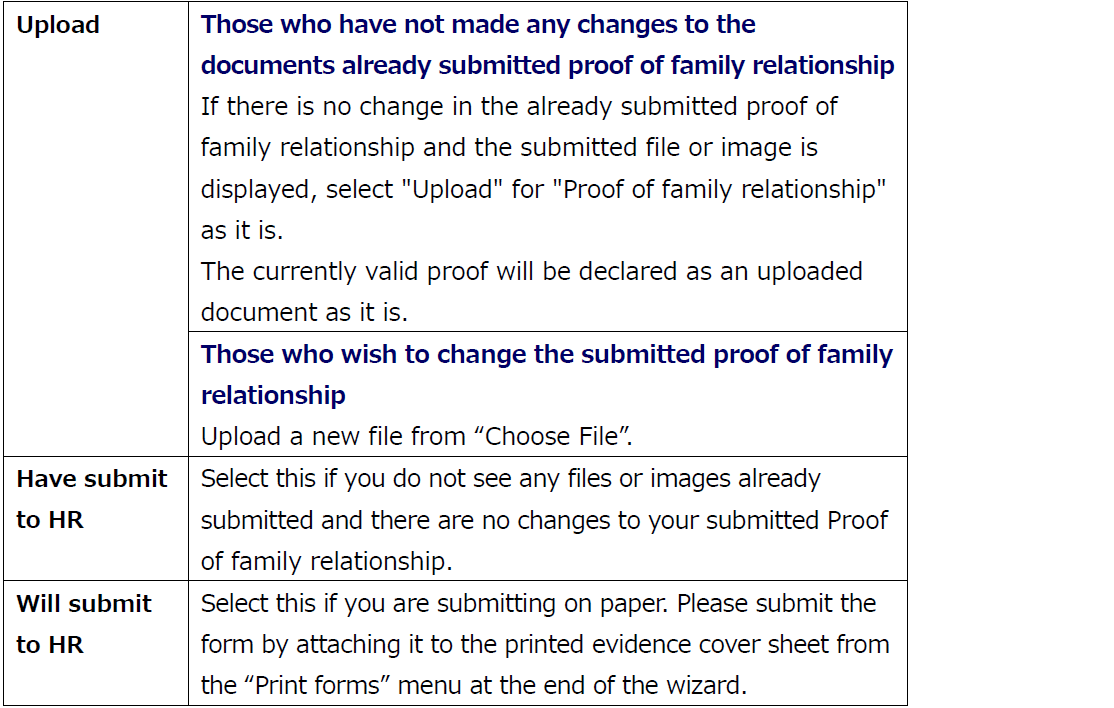
【For those who will be submitting】
Confirmation of deductible
If the answer is "yes" to questions "Studying overseas," change to "Yes."
If the answer is "Do you intend to send 380,000 JPY or more to this dependent?," change to "Yes." Select "Yes" even if you have already send more than 380,000 JPY.
Please specify if he (or she) is eligible for the "Disability exemption.
Proof of money transfer
You must submit (upload) it for this year.
Even if there is no change in the proof of family relationship, you are required to submit proof of money transfer each year for that year (this year is 2025).
If you select "Will submit to HR," you will be listed in the list of certifications when you print the evidence cover sheet from the "Print forms" menu at the end of the wizard. Please attach the certification documents to that paper and submit it.
<Those who selected “Do you intend to send 380,000 JPY or more to this non-resident of Japan dependent?: Yes>
Proof of money transfer 380,000 yen or more is required. Please submit (upload) a total of 380,000 yen or more.
If you select "Proof of money transfer: upload" and upload more than one certificate, please go to "Add more files" to upload the second and subsequent certificates.
③ Click on "Submit changes.
④ Confirm and click “Next”. If corrections are needed, click “Edit” to make corrections.
⑤ Enter your spouse's income for the current year.
The amount you enter should be in yen, not in 10 thousand yen (e.g., for 1 million yen, enter 1,000,000).
The amount calculated automatically by subtracting income expenses and basic deductions from the income amount you entered will be reflected in the “Total income.”
Click “Next.”
Go to “9-2 Spouse information (next year)” .
(Example5) Those with marital status "Never married" who are married and register as a spouse for tax deductible
First, you need to register your spouse.
Select “Yes, I want to set my status to married and add my spouse as tax deductible this year,” then click “Next”.
On the next screen, register your spouse's information and click "Submit changes.
Note: To enter your spouse information, see (Example4).
After completing the form, click "Next" and proceed to "9-2 Spouse information (next year)".
9-2 Spouse information (next year)
If you are declaring your spouse to be tax deductible for “next” year, on "SPOUSE INFORMATION (NEXT YEAR)" screen, select "Yes, set my spouse as tax deductible for next year". Then click "Next".
Enter your spouse’s projected income for next year.
If the income is expected to be the same as this year, click “Same as this year.”
You can also register your spouse’s projected income by clicking “Change income” and entering the required details.
The amount you enter should be in yen, not in 10 thousand yen (e.g., for 1.1 million yen, enter 1,100,000).
The amount calculated automatically by subtracting income expenses and basic deductions from the income amount you entered will be reflected in the “Next year spouse predicted income.”
*It is not possible to enter directly into the "Next year spouse predicted income" field.
When finished, click “Next.
Lastly, review the SPOUSE TAX DEDUCTION RESULTS then click “Next.”
10. Dependents information
First check the information of your dependents for this year, then check the information of your dependents for next year.
If any of your dependents are aged 19 or older but under 23, they may qualify for the “Deduction for dependent of the same household (特定親族特別控除).” Enter their income amount on the ‘Edit’ screen and check eligibility under the “Data input confirmation” menu.
Requirements of “Deduction for dependent of the same household (特定親族特別控除)”
・A family member between the ages of 19 and 23 who shares a household with you.
・That family member's taxable total income for the year is over 580,000 yen but not exceeding 1,230,000 yen (or over 1,230,000 yen but not exceeding 1,880,000 yen if the income is salary income only).
*This category of family members also includes foster children who have been entrusted for care under the provisions of the Child Welfare Act.
Please refer to one of the following
・Those who have no family dependents
・Those who add dependents because they are not yet registered
・Those who do not have dependents this year but plan to have them next year
・Those who have registered their family dependents
Those who have no family dependents
The "Dependents information" screen will be skipped.
If you make a mistake under "Spouse information" and select "No, I have no spouse, but I do have dependents." this will be displayed.
If so, on the "Dependent information (this year)" page, check "No tax dependents" and select "Next. Click "Next" on the "Dependent information (next year)" page as it is.
Those who add dependents because they are not yet registered
Even if you do not have a registered spouse, this screen will appear if you have selected "No, I have no spouse, but I do have dependents" in the "Spouse information" menu.
① On "Dependents information (this year)," check "Have tax dependents."
② Click on the "Submit a new family member" button.
If the family member you are adding is 19 years of age or older but under 23 years of age, please refer to the section “Dependents between the ages 19 and 23” below.
③ Enter information for tax dependents.
* If you do not know their "My Number Tax ID" number, leave it blank.
Enter the income information for the newly added dependent for this year.
Click on “Change income” in the “Taxable income” field. There, enter the income amount and income expenses the income type.
The amount you enter should be in yen, not in 10 thousand yen (e.g., for 1 million, enter 1,000,000.)
The amount calculated automatically by subtracting income expenses and basic deductions from the income amount you entered will be reflected in the “Total income.”
④ Click on "Submit changes.
Notes: If you click “Submit changes” without clicking “Change income,” a message will appear stating that income amount entry is required, preventing you from proceeding.
Click “Change income” and enter the dependent's income information for this year.
If there is no income, click “Change income,” then click “Submit changes” without entering anything.
⑤ This year's confirmation screen will appear. Confirm it and click “Next.”
⑥ The "Dependents information (next year)" screen will appear. If you plan to keep the same information entered in "Dependents Information (this year)" page next year, click "Next".
If you plan to change from this year, change the information from the "Edit" screen and click "Submit changes". Then click "Next." Go to “11. Digital insurance records.”
Note: If the deductible dependent is a non resident, refer also "Deductible dependent is non resident".
[Social insurance dependent and Tax dependent settings]
When you add a dependent in YTA Wizard, it is set up with “Social insurance dependent: No” and “Tax Dependent: Yes”.
If any of the following applies to you, please contact your HR. Your HR (or other department) member can change it.
・Social insurance dependent: Yes /Tax dependent: Yes
・Social insurance dependent: Yes /Tax dependent: No
・Social insurance dependent: No /Tax dependent: No
*Please let them know if next year (2026) is planned to be the same as the above setting or different from this year's setting.
Dependents between the ages 19 and 23
If the family member you are adding is 19 years of age or older but under 23 years of age, they may qualify for the “Deduction of dependent for the same household (特定親族特別控除).”
Based on the birth date and taxable total income amount you enter on the additional screen, they will be set as eligible individuals.
After adding it, please check the “Data input confirmation” menu to verify whether he/she is eligible for this deduction.
Conditions for the “Deduction for dependent of the same household (特定親族特別控除)”
Family member is eligible for this deduction if both of the following conditions are met:
・The family member aged 19 or older but under 23 who is a household with you as a resident.
・That family member's taxable total income for the year is over 580,000 yen but not exceeding 1,230,000 yen (or over 1,230,000 yen but not exceeding 1,880,000 yen if the income consists only of salary income).
*This category of family members also includes foster children who have been entrusted for care under the provisions of the Child Welfare Act.
If the total income of a family member is 580,000 yen or less, they are not eligible for the Deduction of dependent for the same household but are eligible for the Deduction for dependents.
③ Enter information for tax dependents.
*If you do not know their “My Number TAX ID” number, leave it blank.
④ Click “Change income” under “Taxable income”.
⑤ Enter the income and expenses for the income types by the dependent you are adding this year.
The amount you enter should be in yen, not in 10 thousand yen (e.g., for 1.28 million, enter 1,280,000.)
The amount calculated automatically by subtracting income expenses and basic deductions from the income amount you entered will be reflected in the “Total income.”
⑥ Click on “Submit changes.”
Notes: If you click “Submit changes” without clicking “Change income,” a message will appear stating that income amount entry is required, preventing you from proceeding.
Click “Change income” and enter the dependent's income information for this year.
If there is no income, click “Change income,” then click “Submit changes” without entering anything.
⑦ This year's confirmation screen will appear. Confirm it and click “Next.”
Notes: If the taxable income amount you entered qualifies for the Deduction for dependent of the same household, when you check it in the “Data input confirmation” menu, his “Dependent of the same household from 19-23 years old” will be set to “Yes”.
If the total income amount you entered does not qualify for the Deduction of dependent for the same household (特定親族特別控除), (e.g., it exceeded the upper limit or fell below the lower limit), it will be set to “No.”
⑧ The "Dependents information (next year)" screen will appear. If you plan to keep the same information entered in "Dependents Information (this year)" page next year, click "Next".
If you plan to change from this year, change the information from the "Edit" screen and click "Submit changes". Then click "Next." Go to “11. Digital insurance records.”
Note: If the deductible dependent is a non resident, refer also “Deductible dependent is non resident”.
[Social insurance dependent and Tax dependent settings]
When you add a dependent in YTA Wizard, it is set up with “Social insurance dependent: No” and “Tax Dependent: Yes”.
If any of the following applies to you, please contact your HR. Your HR (or other department) member can change it.
・Social insurance dependent: Yes /Tax dependent: Yes
・Social insurance dependent: Yes /Tax dependent: No
・Social insurance dependent: No /Tax dependent: No
*Please let them know if next year (2026) is planned to be the same as the above setting or different from this year's setting.
Those who do not have dependents this year but plan to have them next year
Even if you do not have a registered spouse, this screen will appear if you have selected “No, have no spouse, but I do have dependents” under “Verify Spouse information”.
① On "Dependents information (this year)," check "No tax dependents."
② Click "Next."
③ The "Dependents information (next year)" screen will appear. Click "Submit a new tax dependent.
④ Enter information for tax dependents.
* If you do not know their "My Number Tax ID" number, leave it blank.
Enter the income information for the newly added dependent for next year.
Click on “Change income” in the “Taxable income” field. There, enter the income amount and income expenses the income type.
The amount you enter should be in yen, not in 10 thousand yen (e.g., for 1 million, enter 1,000,000.)
The amount calculated automatically by subtracting income expenses and basic deductions from the income amount you entered will be reflected in the “Total income.”
⑤ Click on "Submit changes.
Notes: If you click “Submit changes” without clicking “Change income,” a message will appear stating that income amount entry is required, preventing you from proceeding.
Click “Change income” and enter the dependent's expected income information for next year.
If there is no income, click “Change income,” then click “Submit changes” without entering anything.
⑥ Click "Next." Go to “11. Digital insurance records.”
Note: If the deductible dependent is a non resident, refer also "Deductible dependent is non resident."
[Social insurance dependent and Tax dependent settings]
When you add a dependent in YTA Wizard, it is set up with “Social insurance dependent: No” and “Tax Dependent: Yes”.
If any of the following applies to you, please contact your HR. Your HR (or other department) member can change it.
・Social insurance dependent: Yes /Tax dependent: Yes
・Social insurance dependent: Yes /Tax dependent: No
・Social insurance dependent: No /Tax dependent: No
*Please let them know if next year (2025) is planned to be the same as the above setting or different from this year's setting.
Those who have registered their family dependents
Note: If your dependents live abroad, please also refer to "Deductible dependent is non resident" in the lower section.
If the family member is 19 years of age or older but under 23 years of age, please refer to the section “Dependents between the ages 19 and 23” below.
① On "Dependents information (this year)," check the information of your dependents.
If they are 16 years of age or older, you must enter their taxable income amount in the edit screen.
(If they are 16 years old or younger, have no income, and there are no changes to the content, click “Next.”)
When adding a family dependent, click "Submit a new family member" button to register your dependents' information and click "Submit changes". After that, click "Next."
[Edit screen]
Select "Yes" to change to tax deductible. If there are any other changes, please make them. Click “Change income” under “Taxable income”.
Enter the income information for the newly added dependent for this year.
Click on “Change income” in the “Taxable income” field. There, enter the income amount and income expenses the income type.
The amount you enter should be in yen, not in 10 thousand yen (e.g., for 1 million, enter 1,000,000.)
The amount calculated automatically by subtracting income expenses and basic deductions from the income amount you entered will be reflected in the “Total income.”
Click on "Submit changes.
Note 1: If you click “Submit changes” without clicking “Change income,” a message will appear stating that income amount entry is required, preventing you from proceeding.
Click “Change income” and enter the dependent's income information for this year.
If there is no income, click “Change income,” then click “Submit changes” without entering anything.
Note 2: If the dependent is 16 years old or older, clicking “Submit changes” without opening the edit screen will display the message shown above.
In that case, click “Change income” and enter the dependent's income information for this year.
If there is no income, click “Change income,” then click “Submit changes” without entering anything.
② This year's confirmation screen will appear. Confirm it and click “Next.”
③ The "Dependents information (next year)" screen will appear. If you plan to remain the same next year, click "Next".
If you plan to change from this year, change the information from the "Edit" screen and click "Submit changes". Then click "Next." Go to “11. Digital insurance records.”
Dependents between the ages 19 and 23
If the family member is 19 years of age or older but under 23 years of age, they may qualify for the “Deduction of dependent for the same household (特定親族特別控除).”
He (she) is set as an eligible recipient based on his age and taxable income amount.
Enter the income amount on the “Edit” screen and confirm eligibility for deduction on the “Data input confirmation” menu.
Conditions for the “Deduction for dependent of the same household (特定親族特別控除)”
Family member is eligible for this deduction if both of the following conditions are met:
・The family member aged 19 or older but under 23 who is a household with you as a resident.
・That family member's taxable total income for the year is over 580,000 yen but not exceeding 1,230,000 yen (or over 1,230,000 yen but not exceeding 1,880,000 yen if the income consists only of salary income).
*This category of family members also includes foster children who have been entrusted for care under the provisions of the Child Welfare Act.
If the total income of a family member is 580,000 yen or less, they are not eligible for the Deduction of dependent for the same household but are eligible for the Deduction for dependents
① Since he(she) is 19 years old or older but under 23 years old, a confirmation banner is displayed. Click “Edit”.
② Click “Change income.”
③ Enter your dependents' income types, expenses, and other details for this year.
The amount you enter should be in yen, not in 10 thousand yen (e.g., for 1.28 million, enter 1,280,000.)
The amount calculated automatically by subtracting income expenses and basic deductions from the income amount you entered will be reflected in the “Total income.”
④ Click on “Submit changes.”
Notes: If you click “Submit changes” without clicking “Change income,” a message will appear stating that income amount entry is required, preventing you from proceeding.
Click “Change income” and enter the dependent's income information for this year.
If there is no income, click “Change income,” then click “Submit changes” without entering anything.
⑤ This year's confirmation screen will appear. Confirm it and click “Next.”
Notes: If the taxable income amount you entered qualifies for the Deduction for dependent of the same household, when you check it in the “Data input confirmation” menu, his “Dependent of the same household from 19-23 years old” will be set to “Yes”.
If the total income amount you entered does not qualify for the Deduction of dependent for the same household (特定親族特別控除), (e.g., it exceeded the upper limit or fell below the lower limit), it will be set to “No.”
⑥ The "Dependents information (next year)" screen will appear. If you plan to keep the same information entered in "Dependents Information (this year)" page next year, click "Next".
If you plan to change from this year, change the information from the "Edit" screen and click "Submit changes". Then click "Next." Go to “11. Digital insurance records.”
Deductible dependent is non resident
You are required to submit “proof of family relationship” and “Proof of money transfer for this year.”
Even if you submitted both last year, the proof of money transfer must be submitted for this year (2025), please upload (or submit to your HR) on the edit screen of “Dependent information (this year)”.
If there have been any changes to the contents of the proof of family relationship you have already submitted, please upload (or submit) proof proving the most recent changes to your family relationships.
For all certificated documents, a Japanese translation of the document must also be attached.
If your dependent is a non-resident between the ages of 30 and 70, see “Non residents between the ages of 30 and 70”.
If the family member is 19 years of age or older but under 23 years of age, please refer to the section “Non residents between the ages of 19 and 23” below.
Non-residents who departed Japan during the year (or arrived in Japan during the year and returned home by year-end, etc.) are eligible for the Deduction of dependent for the same household (特定親族特別控除) if their total income earned during their stay in Japan this year exceeds ¥580,000 but does not exceed ¥1,230,000 (or exceeds ¥1,230,000 but does not exceed ¥1,880,000 if their income consists only of salary income).
① Click "Edit" under "Dependent information (this year).
If he (she) is 16 years of age or older, you must enter the taxable amount of domestic income in the editing screen.
② Set up the Proof of family relationship and Proof of money transfer fields.
Proof of family relationship
【Those who have already submitted】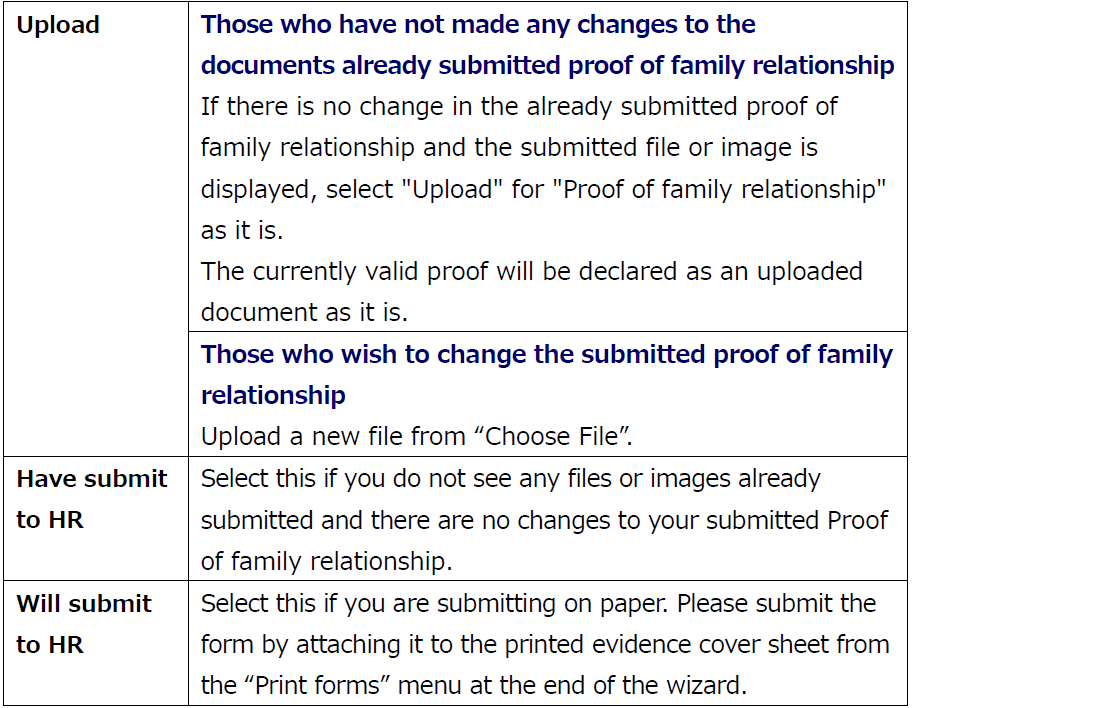
【Those who have already submitted】
Proof of money transfer
You must submit (upload) it for this year.
Even if there is no change in the proof of family relationship, you are required to submit proof of money transfer each year for that year (this year is 2025).
If you select "Will submit to HR," you will be listed in the list of certifications when you print the evidence cover sheet from the "Print forms" menu at the end of the wizard. Please attach the certification documents to that paper and submit it.
If you select "Proof of money transfer: upload" and upload more than one certificate, please go to "Add more files" to upload the second and subsequent certificates.
③ Enter the domestic source income information for this dependent in Japan.
Click “Change income” in the “Taxable income” field. There, enter the income and expenses for the applicable income type.
(If he (she) is not employed in Japan this year, enter “0”.)
The amount you enter should be in yen, not in 10 thousand yen (e.g., for 1 million, enter 1,000,000.)
The amount calculated automatically by subtracting income expenses and basic deductions from the income amount you entered will be reflected in the “Total income.”
④ Click on "Submit changes.
Notes: If you click “Submit changes” without clicking “Change income,” a message will appear stating that income amount entry is required, preventing you from proceeding.
Click “Change income” and enter the dependent's domestic income information for this year.
If there is no income in Japan, click “Change income,” then click “Submit changes” without entering anything.
⑤ Confirm and click “Next”.
⑥ The “Dependents information (next year)” screen will appear. If you plan to keep the same information next year, click “Next”.
If the information is scheduled to change from this year, change it from the “Edit” screen and click “Submit changes. Then click “Next.
Go to “11. Digital insurance records.”
Non residents between the ages of 30 and 70
Non residents between the ages of 30 and 70 are, in principle, not be eligible for tax deduction from 2023.
Please check if he (she) is eligible for the tax deduction from the "Dependent information (this year)" and "Dependent information (next year)" edit screens.
Note: If he (or she) meets any of the following conditions, he (or she) is eligible for the deduction as before.
・No longer have a domicile or residence in Japan due to studying abroad
・Disabled person
・Received more than 380,000 payments to cover living expenses or educational expenses in the year from a resident who would be eligible for the tax deductible.
① On "Dependents information (this year)," click "Edit.
If he (she) is 16 years of age or older, you must enter the taxable amount of domestic income in the editing screen.
② Set up Proof of family relationship, confirmation of deductible, and Proof of money transfer fields.
Proof of family relationship
【Those who have already submitted】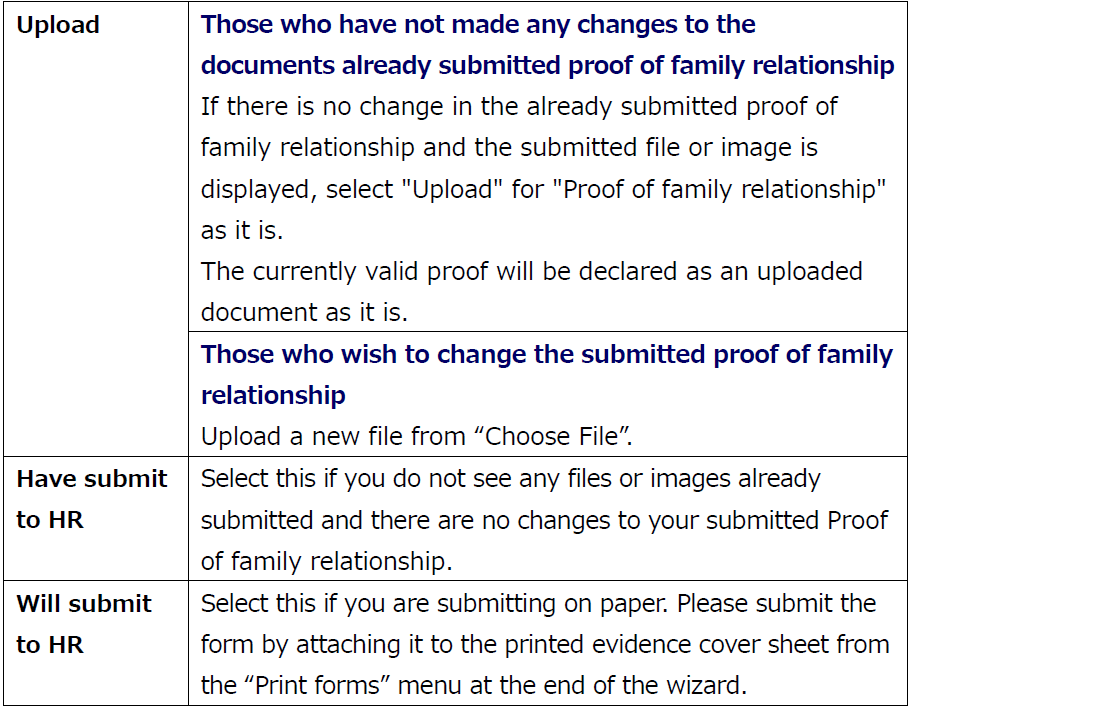
【For those who will be submitting】
Confirmation of deductible
If the answer is "yes" to questions "Studying overseas," change to "Yes."
If the answer is "Do you intend to send 380,000 JPY or more to this dependent?," change to "Yes." Select "Yes" even if you have already send more than 380,000 JPY.
Please specify if he (or she) is eligible for the "Disability exemption.
Proof of money transfer
You must submit (upload) it for this year.
Even if there is no change in the proof of family relationship, you are required to submit proof of money transfer each year for that year (this year is 2025).
If you select "Will submit to HR," you will be listed in the list of certifications when you print the evidence cover sheet from the "Print forms" menu at the end of the wizard. Please attach the certification documents to that paper and submit it.
<Those who selected “Do you intend to send 380,000 JPY or more to this non-resident of Japan dependent?: Yes>
Proof of money transfer 380,000 yen or more is required. Please submit (upload) a total of 380,000 yen or more.
If you select "Proof of money transfer: upload" and upload more than one certificate, please go to "Add more files" to upload the second and subsequent certificates.
③ Enter the domestic source income information for this dependent in Japan.
Click “Change income” in the “Taxable income” field. There, enter the income and expenses for the applicable income type.
(If he (she) is not employed in Japan this year, enter “0”.)
The amount you enter should be in yen, not in 10 thousand yen (e.g., for 1 million, enter 1,000,000.)
The amount calculated automatically by subtracting income expenses and basic deductions from the income amount you entered will be reflected in the “Total income.”
④ Click on "Submit changes.
Notes: If you click “Submit changes” without clicking “Change income,” a message will appear stating that income amount entry is required, preventing you from proceeding.
Click “Change income” and enter the dependent's domestic income information for this year.
If there is no income in Japan, click “Change income,” then click “Submit changes” without entering anything.
⑤ Confirm and click “Next”.
⑥ The “Dependents information (next year)” screen will appear. Click “Edit”.
⑦ If you plan to change the content from this year, please change it. (If you plan to keep the content the same as this year, click “Cancel”.)
Change to “Yes” if applicable to the questions “Studying overseas” or “Do you intend to send 380,000 JPY or more to this non-resident of Japan dependent.” Specify if “Disability exemption” applies.
⑧ Click on "Submit changes.
⑨ Confirm and click “Next. Go to “11. Digital insurance records.”
Non residents between the ages of 19 and 23
If the family member you are adding is 19 years of age or older but under 23 years of age, they may qualify for the “Deduction of dependent for the same household (特定親族特別控除).”
He(she) is set as an eligible recipient based on his age and taxable income amount.
Enter the income amount on the “Edit” screen and confirm eligibility for deduction on the “Data input confirmation” menu.
<Cases where non-residents qualify for the Deduction of dependent for the same household>
He (she) qualifies as an eligible individual if both of the following conditions apply:
・He (she) is a dependent within the eligible age range and is a nonresident who departed Japan during the current year (or arrived in Japan during the current year and returned home by year-end, etc.).
・The total amount of income he (she) earned during their stay in Japan this year is over ¥580,000 but not exceeding ¥1,230,000 (or, if their income consists only of salary income, over ¥1,230,000 but not exceeding ¥1,880,000). (If the total income of a family member is 580,000 yen or less, they are not eligible for the Deduction of dependent for the same household but are eligible for the Deduction for dependents.)
*This category of family members also includes foster children who have been entrusted for care under the provisions of the Child Welfare Act.
① Since he(she) is 19 years old or older but under 23 years old, a confirmation banner is displayed. Click “Edit”.
② Set up the proof of family relationship and proof of money transfer fields.
Proof of family relationship
【Those who have already submitted】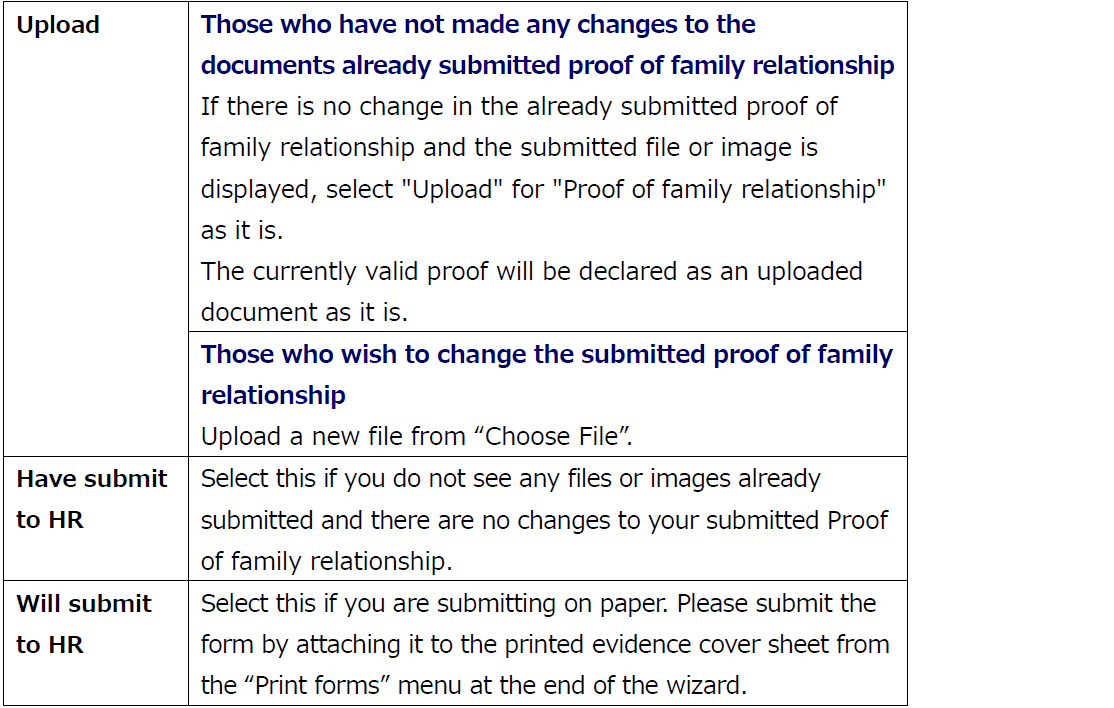
【For those who will be submitting】
Proof of money transfer
You must submit (upload) it for this year.
Even if there is no change in the proof of family relationship, you are required to submit proof of money transfer each year for that year (this year is 2025).
If you select "Will submit to HR," you will be listed in the list of certifications when you print the evidence cover sheet from the "Print forms" menu at the end of the wizard. Please attach the certification documents to that paper and submit it.
If you select "Proof of money transfer: upload" and upload more than one certificate, please go to "Add more files" to upload the second and subsequent certificates.
③ If that dependents left Japan during the year (or arrived in Japan during the year and returned home by year-end, etc.), enter the taxable total income amount earned during their stay in Japan this year.
(If he (she) is not employed in Japan this year, enter “0”.)
Click “Change income” in the “Taxable income” field and enter the income and expenses for the applicable income type.
If the income is over ¥580,000 but not exceeding ¥1,230,000 (or over ¥1,230,000 but not exceeding ¥1,880,000 if the income is only salary income), he (she) qualifies for the Deduction of dependent for the same household.
The amount you enter should be in yen, not in 10 thousand yen (e.g., for 1.28 million, enter 1,280,000.)
The amount calculated automatically by subtracting income expenses and basic deductions from the income amount you entered will be reflected in the “Total income.”
④ Click on "Submit changes.
Notes: If you click “Submit changes” without clicking “Change income,” a message will appear stating that income amount entry is required, preventing you from proceeding.
Click “Change income” and enter the dependent's domestic income information for this year.
If there is no income in Japan, click “Change income,” then click “Submit changes” without entering anything.
⑤ This year's confirmation screen will appear. Confirm it and click “Next.”
Notes: If the taxable income amount you entered qualifies for the Deduction for dependent of the same household, when you check it in the “Data input confirmation” menu, his “Dependent of the same household from 19-23 years old” will be set to “Yes”.
If the total income amount you entered does not qualify for the Deduction of dependent for the same household (特定親族特別控除), (e.g., it exceeded the upper limit or fell below the lower limit), it will be set to “No.”
⑥ The "Dependents information (next year)" screen will appear. If you plan to keep the same information entered in "Dependents Information (this year)" page next year, click "Next".
If you plan to change from this year, change the information from the "Edit" screen and click "Submit changes". Then click "Next." Go to “11. Digital insurance records.”
Next "④Confirmation of insurance and other deductions". Click here.
To return to the previous page, "②Confirmation of your personal information", click here.
Click here for the Japanese version of this manual.